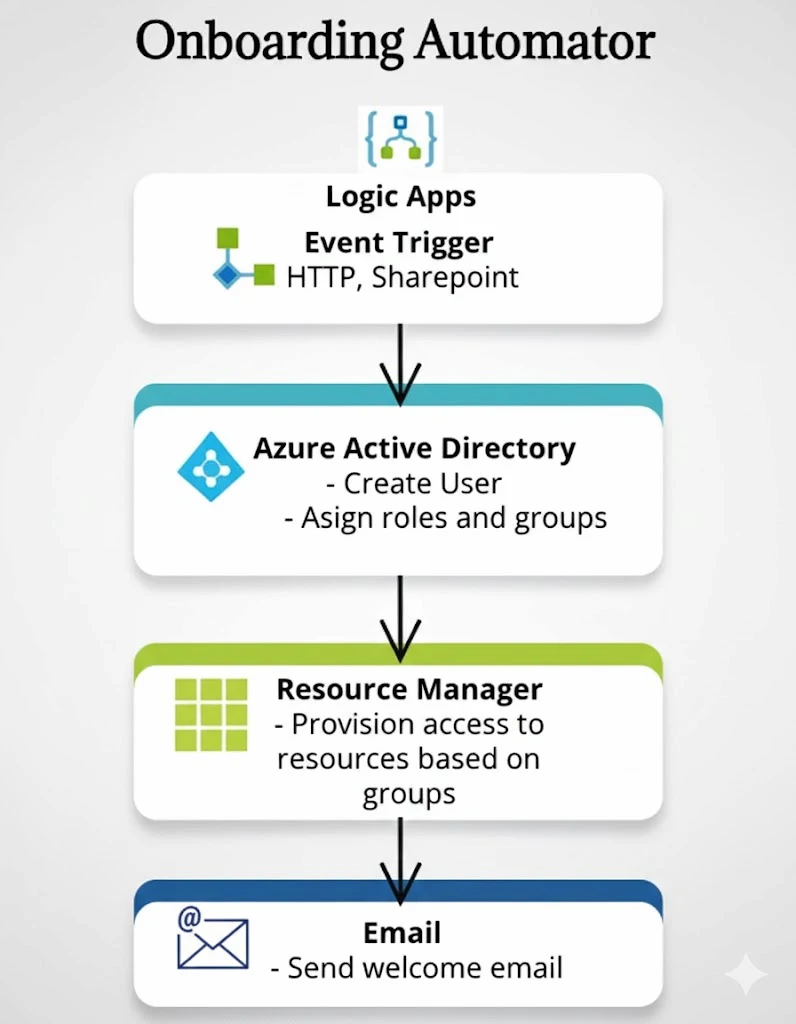
AZURE ONBOARDING AUTOMATORIdentity and access automation for new employee onboarding.
A hands-on Azure identity automation project using Logic Apps, Microsoft Entra ID, security groups, RBAC thinking, email notifications, and monitoring evidence to standardize the new-starter process.
● TRIGGER / SHAREPOINT LIST · EMAIL · ONBOARDING REQUEST● IDENTITY / ENTRA USER CREATION + GROUP ASSIGNMENT● EVIDENCE / RUN HISTORY + EMAIL + DIRECTORY LOGS
IDENTITY / CONTROL SURFACEONBOARDING AUTOMATION FLOW
● ACTIVE
TRIGGERHR REQUEST
IDENTITYENTRA ID
AUDITRUN HISTORY
HR / Manager request
→ SharePoint list or email trigger
→ Azure Logic App workflow
→ Create user in Microsoft Entra ID
→ Assign security group / access template
→ Send welcome + IT notification emails
→ Review Logic App run history + Entra logs
01 / OVERVIEW
WHAT AZURE ONBOARDING AUTOMATOR SOLVES.
New employee onboarding is often repetitive, inconsistent, and dependent on manual IT checks. This project converts an HR or manager request into a controlled identity workflow that creates the user, assigns the right access group, sends onboarding communication, and leaves an operational audit trail.
THE PROBLEM
MANUAL ONBOARDING CREATES DELAY, INCONSISTENCY, AND ACCESS RISK.
Without automation, IT teams can create accounts inconsistently, copy access from existing users, miss group assignments, or rely on informal handoffs.
Manual user creation can lead to inconsistent naming and profile standards.
Department-based access is easy to apply incorrectly by hand.
HR, IT, and managers may not know whether onboarding completed successfully.
Support teams need run history and logs to investigate failures.
THE SOLUTION
AUTOMATED IDENTITY PROVISIONING WITH REPEATABLE ACCESS PATTERNS.
Logic Apps orchestrates request intake, user creation, group assignment, welcome email, and operational review in a repeatable Azure-native workflow.
CREATE USERASSIGN GROUPNOTIFY HR / ITMONITOR RUN HISTORYAUDIT EVIDENCE
Reduced new-starter onboarding effort by automating user creation, group assignment, and welcome email delivery.
Reduced manual permission errors by applying department or job-title based access patterns through a repeatable workflow.
Improved security posture by standardizing group membership instead of relying on ad-hoc access requests.
Improved operational visibility through Logic App run history and Entra ID logs.
Standardized communication across HR, IT, managers, and new starters through automated email notifications.
Reduced support delays by providing clear onboarding evidence and workflow execution status.
Created a scalable pattern that can later add approvals, licence assignment, Teams notifications, and RBAC templates.
03 / WORKFLOW ARCHITECTURE
FROM ONBOARDING REQUEST TO READY-TO-USE ACCOUNT.
HR or a manager submits a request, Logic Apps handles orchestration, Entra ID becomes the identity source of truth, and the workflow produces notifications and operational evidence.
AUTOMATION FLOW
01
Onboarding request submitted
SharePoint list, email, or request endpoint
HR or a manager submits new-starter details such as display name, username, email, department, and job title.
02
Logic App workflow starts
Event-driven orchestration
The Logic App captures the trigger payload and passes dynamic values into downstream identity and notification actions.
03
User created in Microsoft Entra ID
Azure AD / Entra connector
The workflow creates the user profile using dynamic fields such as display name, UPN, mail nickname, and request metadata.
04
Access group assigned
Department or job-title based access
The workflow assigns the user to the correct security group so access follows a standard onboarding template.
05
Emails and audit trail generated
Outlook connector + run history
The new starter receives a welcome email, stakeholders are notified, and Logic App run history records execution.
VALIDATION FLOW
01
Submit a test onboarding request
Use a SharePoint entry or email trigger with realistic employee details.
02
Check Logic App run history
Confirm each action completed and inspect failed connector steps if needed.
03
Verify Entra ID user creation
Confirm the expected display name, username, UPN, and profile details.
04
Verify group assignment
Check the user was added to the correct access group.
05
Verify communication and logs
Confirm welcome email delivery and review Entra/Logic App evidence.
HR / Manager
    ↓
Onboarding request
    ↓
SharePoint / Email trigger
    ↓
Azure Logic App
    ↓
Microsoft Entra ID user
    ↓
Security group assignment
    ↓
Outlook notifications
    ↓
Logic App run history + Entra logs
04 / IDENTITY & ACCESS
CONSISTENT IDENTITY PROVISIONING AND GROUP-BASED ACCESS.
USER PROVISIONING
Creates the Entra ID user from submitted onboarding details.
Uses dynamic values for display name, username, UPN, and mail nickname.
Supports HR or manager-driven requests from common Microsoft 365 tools.
Leaves execution evidence in Logic App run history.
ACCESS ASSIGNMENT
Assigns the new user to a department or role-based security group.
Supports least privilege through predefined access templates.
Reduces incorrect access caused by manual onboarding steps.
Can later extend to licence assignment, approval gates, and RBAC role assignment.
05 / EVIDENCE GALLERY
KEY HIGHLIGHTS FROM THE ONBOARDING AUTOMATION BUILD.
Identity setup, Logic App workflow actions, access assignment, and automated communication from the real project evidence.
CLICK ANY EVIDENCE TILE TO INSPECT THE FULL CAPTUREIDENTITY · WORKFLOW · PROVISIONING · NOTIFICATION
06 / VALIDATION WALKTHROUGH
HOW THE ONBOARDING WORKFLOW IS VERIFIED END TO END.
A safe simulation of the same operational checks used in the project: request intake, identity creation, group assignment, communication, run history, and directory evidence.